Stack Media Hosting
  • 0 Shopping Cart
  • Home
  • Store
    • Browse All
    • SSD Shared Hosting
    • WordPress Loginizer Plugin
    • Website Security
    • E-mail Services
    • Register a New Domain
    • Transfer Domains to Us
  • Announcements
  • Knowledgebase
  • Network Status
  • Contact Us
  • More
  • Account
    • Login
    • Register
    • Forgot Password?
  1. Portal Home
  2. Knowledgebase
  3. cPanel
  4. Create new password for your Roundcube email account

  Categories

Cloudflare
2
cPanel
7
Emails
5
General
10
Woocommerce
8
WordPress
27

  Categories

  Support

My Support Tickets
Announcements
Knowledgebase
Downloads
Network Status
Open Ticket

Create new password for your Roundcube email account Print

  • 0

Click on your email address located in the top right corner. This should produce a drop down where you can choose Password & Security.

RoundCube Password & Security Option


This will bring you to the page where you can reset your password.
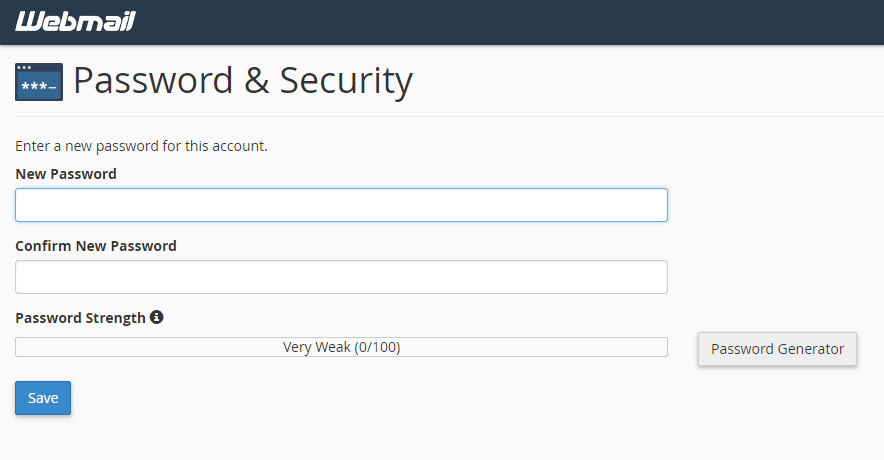
RoundCube reset password page


Author: Jesse Lange


Was this answer helpful?

Related Articles

Login into cPanel First login to your account. Do this by going to Hosting -> My Account or visit... Setting up a File Transfer Protocol (FTP) This article covers how to create a File Transfer Protocol (FTP). First log into your cPanel on... How to restore a website backup in cPanel In order to do this you will need a backup file of the site you want to upload. Our article  on... Forward all emails from cPanel Webmail PDF Download You can set up all your emails to get forwarded from cPanel Webmail to go to any... What is File Transfer Protocol (FTP) File Transfer Protocol (FTP) is a way to transfer files like text documents and images to other...
« Back

  Support

My Support Tickets
Announcements
Knowledgebase
Downloads
Network Status
Open Ticket
  • Contact Us

Copyright © 2026 Stack Media Hosting. All Rights Reserved.


Loading...
Loading...
Choose language
العربية
Azerbaijani
Català
中文
Hrvatski
Čeština
Dansk
Nederlands
English
Estonian
Persian
Français
Deutsch
עברית
Magyar
Italiano
Macedonian
Norwegian
Português
Português
Română
Русский
Español
Svenska
Türkçe
Українська

Generate Password

Please enter a number between 8 and 64 for the password length